The new Persistent Player allows you to continue listening to your favourite show or live stream while browsing the BBC Sounds area of the BBC website.
Where can I see what's playing?
When you start listening to a programme or live stream, the playback will appear at the bottom of the screen in a playback bar.
While you browse the BBC Sounds site, whether that’s looking at the episode information, schedules or exploring the homepage, your current programme or live stream will show at the bottom of the screen.
How do I control playback?
The minimised player offers full playback and navigation tools, allowing you to control the content as you browse the site.
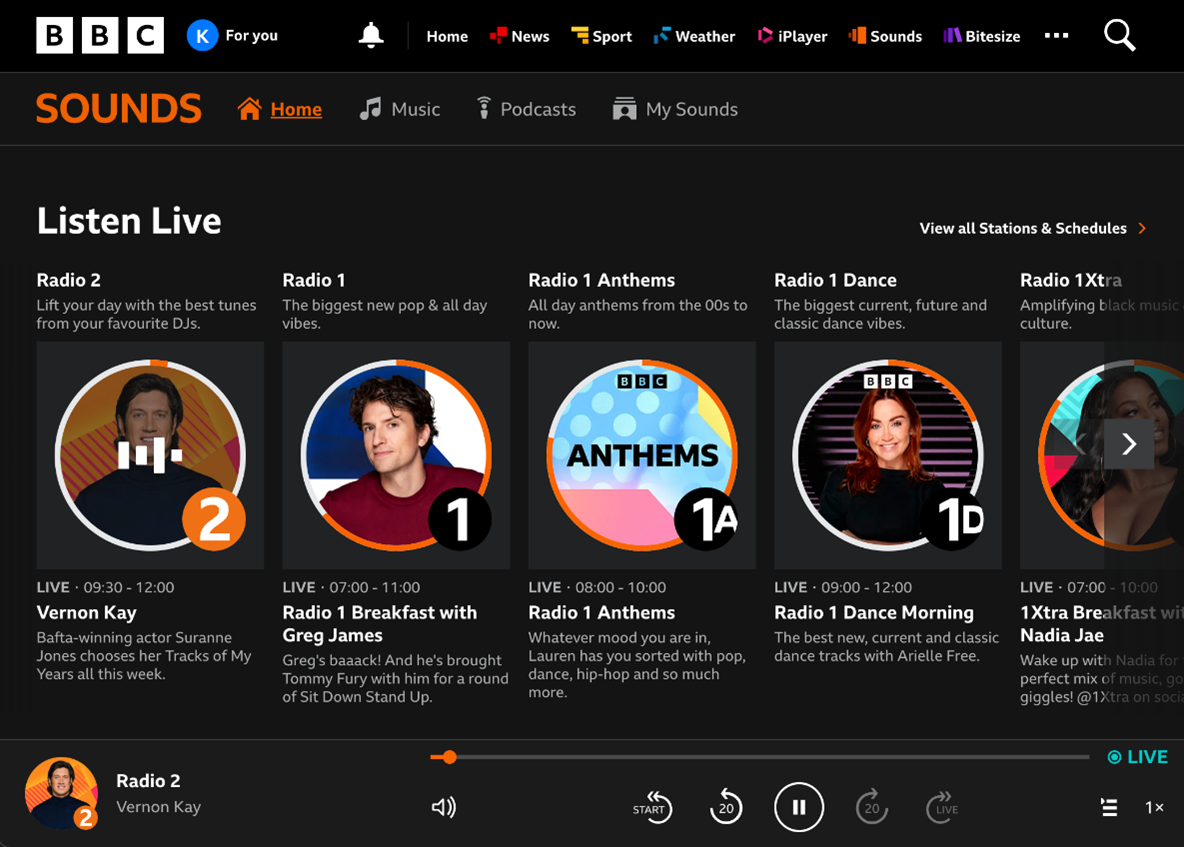
You can play and pause, adjust the volume, navigate through the programme or live stream, and adjust the speed of playback using the on-screen buttons. The play queue icon will show what is coming up next, either in the schedule when listening live, or subsequent episodes when you're listening on demand.
When listening to on demand programmes, clicking the speech bubble icon will display a transcript of the show on the right. This will also remain on screen while you browse the site.
For more information on playback controls, have a look here: How do I fast forward, rewind, pause or play on BBC Sounds?
What if I visit other areas of the site?
At the moment, the player is available when using the BBC Sounds website. If you head to another area of the site, for example BBC iPlayer or BBC News, the playback will stop. However, when you return to BBC Sounds, the playback bar will be available again, allowing you to continue from where you left off.
Can I easily get back to the episode or programme page?
Yes! Simply click on the programme or station name on the player to open up the episode information.